Starting operation
- Pay attention to the mains voltage! The voltage of the power source must match the voltage specified on the rating plate of the power tool.
Use the impact/mode selector switch (12) to select the power tool operating mode.
- To change the operating mode, press the release button (11) and turn the impact/mode selector switch (12) to the required position until it audibly engages.
Note: Only change the operating mode when the power tool is switched off. Otherwise, the power tool may become damaged.

Position for hammer drilling into concrete or stone
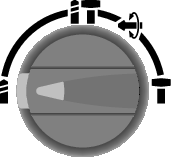
Position for drilling without impact in wood, metal, ceramic and plastic and for screwdriving

Vario-Lock position for adjusting the chisel position
The impact/mode selector switch (12) will not engage in this position.
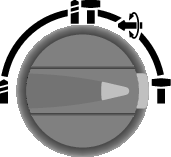
Position for chiselling
The rotational direction switch (8) is used to change the rotational direction of the power tool. However, this is not possible while the on/off switch (10) is being pressed.
- Operate the rotational direction switch (8) only when the power tool is not in use.
Always set the rotational direction to clockwise for hammer drilling, drilling and chiselling.
- Rotate clockwise: Turn the rotational direction switch (8) on both sides until it stops in the
 position.
 - Rotate anticlockwise: Turn the rotational direction switch (8) on both sides until it stops in the
 position.

You can lock the chisel in 36 positions. This makes it possible for you to always work in the ideal position.
- Insert the chisel into the tool holder.
- Turn the impact/mode selector switch (12) to the “Vario-Lock” position.
- Turn the application tool to the required chisel position.
- Turn the impact/mode selector switch (12) to the “Chiselling” position. With this, the tool holder is locked.
- Set the rotational direction for chiselling to clockwise.